
We’re sorry to hear you’re having problems with your heating and/or hot water. Our Emergency supply issues: quick troubleshooting guide explains what to check and how to get help. You may find it useful to download and keep handy.
If you have a pay-as-you-go (PAYG) meter in your home, before getting in touch with us, please perform the following checks:
- That your heating/cooling controls (e.g., thermostat, programmer, thermostatic radiator valves (TRVs)) are set correctly,
- Your energy meter and HIU are on and undamaged,
- That your PAYG account balance is in credit above your cut-off limit. If not, please top-up. If you’ve recently made a top-up, please allow up to one (1) hour for this to be applied to your account,
- You have electricity to your property,
- Whether both your heating & hot water are affected. If only one is affected, please contact your heat supplier or maintenance provider.
If you see water leaking from your HIU or suspect an electrical fault, do not attempt any further checks. Contact your heat supplier or emergency contact immediately.
If you’ve completed these checks and still have no heating or hot water, please contact your heat supplier or emergency contact. For help with your PAYG balance, top-ups or payments, please contact Insite Energy. You can find the relevant contact details by searching for your postcode or development name in our directory. For urgent supply issues, we recommend calling.
Not sure who to contact? Our Who do I contact on my heat network? guide explains the roles of your heat supplier, metering & billing provider, emergency contact and ESCo Manager, and what each can help with.
If you are having problems contacting your heat supplier, please get in touch with Insite Energy via our ‘Get in touch’ page.
Please note, unless appointed as your maintenance provider, Insite Energy are not responsible for your energy supply, nor do we maintain the heating system at your development or in your property. Unfortunately, as a result and unless contracted, Insite Energy are unable to help you with the maintenance of the heating system within your property.
For queries relating to your electricity and water supply, please contact your relevant suppliers.
If you’re a KURVE resident and have received an email receipt following top-up but it still hasn’t appeared on your account after one (1) hour, please get in touch with our helpdesk and we will investigate this for you.
If you have recently topped up but it has not appeared on your PAYG Hub, you may need to manually enter the 20-digit payment code (Unique Transaction Reference Number or UTRN) into your PAYG Hub. You will find this on your payment receipt (email, paper or SMS). Instructions on how to perform a manual top-up can be found below.
If your top-up shows on your PAYG Hub but not on your ‘my insite’ account, please wait up to 24-hours for this to show. If your top-up still hasn’t appeared on your balance and payment history after this time, please contact our helpdesk.
Guru Hub II residents
Instructions on how to complete a manual top-up on your Guru Hub II can be found in this short video at timestamp 1:19.
Guru Hub I residents
1. Press ‘Top Up’ on the Hub:
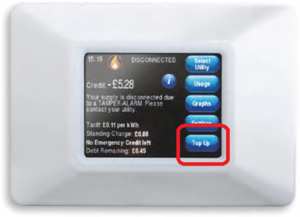
2. Use the numeric keypad to enter the 20-digit top-up code found on your receipt:
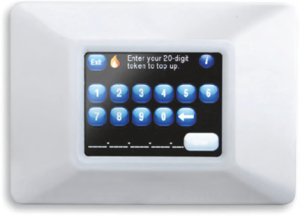
3. Return to the main screen and you will see your balance has been updated.
If you cannot find your top-up code, please contact customer services via our ‘Get in touch’ page.
If you have recently topped up but it has not appeared on your PAYG Hub, you may need to manually enter the 20-digit payment code (Unique Transaction Reference Number or UTRN) into your PAYG Hub. You will find this on your payment receipt (email, paper or SMS). Instructions on how to perform a manual top-up can be found below.
If your top-up shows on your PAYG Hub but not on your ‘my insite’ account, please wait up to 24-hours for this to show. If your top-up still hasn’t appeared on your balance and payment history after this time, please contact our helpdesk.
1. Enter the ‘Account’ menu, then press ‘Top Up’:

2. Use the numeric keypad to enter the 20-digit top-up code found on your receipt:

3. Your balance will now be updated.
If you cannot find your top-up code, please contact customer services via our ‘Get in touch’ page.
Regular HIU servicing helps your HIU run efficiently and provide you with a reliable heating & hot water supply. While your heat supplier is responsible for managing your heat network, maintaining the HIU may be your responsibility as the leaseholder or tenant. But this doesn’t have to come at a huge cost.
If you’re based in or around London, you can book a HIU service or repair through us to be scheduled around your day. We offer group discounts and multiple service levels to suit your budget. You can view and compare our HIU services, and book it via our HIU support form.
Why HIU servicing matters:
- Efficiency boost: Elevate your home’s energy efficiency with Insite’s expert HIU servicing.
- Reliable heating: Servicing your HIU ensures it continues to deliver you reliable and instantaneous heating & hot water.
- Preventive care: Regular servicing prevents leaks, lime scale build-up, pump seizures, and high energy bills.
Why Insite:
- Proven expertise: With a combined industry experience of 50+ years, our certified engineers understand the CIBSE CP1 Heat Network Code of Practice (2020). This helps to ensure your HIU works in harmony with the entire heat network.
- Cost-effective solution: Insite offers efficient HIU servicing to prioritise your comfort and minimise energy costs. Plus, our group discounts and three different service levels help you find a service that suits your budget.
- System longevity: Trust us for unparalleled expertise in heat network maintenance, maximising your heat network’s lifespan.


Can’t find what you’re looking for?
If you still need help, please give us a call. To find your dedicated scheme phone number, simply search for your development name or postcode in the top search bar.
You can also contact us via one of our webforms for support with your Insite account.