
There are several ways to top-up your PAYG account, so you can choose the option that works best for you:
- Online via KURVE
- Balance-based automatic top-ups via KURVE
- Cash or bank card in any PayPoint outlet
- Over the phone using our interactive voice response (IVR) service.
To top-up online, please login to KURVE and select either ‘Top up’ on the homepage, or click on the ‘Payment’ (£) icon in the navigation bar.
From the KURVE web-app, you can also view your latest balance, manage your stored payment cards, set-up an auto top-up, and view your payment history. Find out more about on our dedicated KURVE webpage.
To set-up an auto top-up on KURVE, navigate to ‘Settings’ and click ‘Automatic Top-up set-up’. There you’ll be able to set-up a balance-based auto top-up. If you have any problems setting up an auto top-up, please get in touch.
A balance-based auto top-up will take an amount of your choosing when your balance falls below a certain amount. For example, top-up £20.00 when your balance reaches £10.00. This ensures that your heating & hot water supply remains connected at all times.
You can top-up in-person at any location that displays the PayPoint logo. You can search for a PayPoint location using their online store locator or by clicking on ‘Find nearest PayPoint store’ under ‘Payment Details’ on KURVE.
At the counter, present your 19-digit barcode to the shop assistant and pay using cash, credit or debit card. You can find your barcode under ‘View payment number & barcode’ within KURVE.
Our telephone interactive voice response (IVR) service is available to you 24/7/365. To use it:
- Have your bank card to hand, as well as your 19-digit payment number.
- Call your scheme-specific phone number.
- Press “1” when prompted.
- Follow the instructions given over the IVR system.
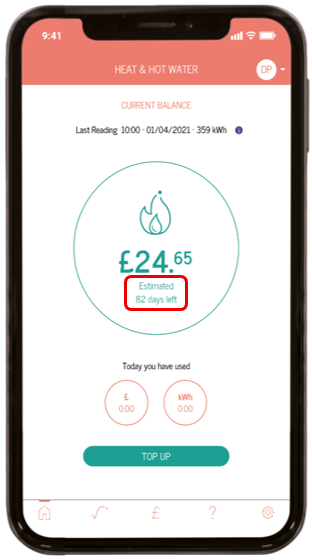
When your account has a positive balance of more than £5, you’ll see ‘Estimated X days left’ shown underneath your balance. This is to give you an idea of how long your credit will last you until you need to top-up again.
This is based on an average of your consumption and daily standing charge over the last 7 days. The accuracy of this estimate will be determined by how much your usage habits change week on week.
Sometimes, you might hear us talk about an issue with your fixed internet connection (FIC) line. A FIC line connects your building’s broadband network to the internet, allowing us to read your meter remotely, and automatically apply top-ups to your KURVE account.
We aim to read your meter every hour. However, if this FIC line goes down, it means the connection between us and your development is temporarily interrupted impacting our ability to talk to your meter and update your account. This means you may not always be able to see up to date consumption data in your KURVE web-app. But this will update once we’re back in communication with your development. In all instances, we’ll always work with your heat supplier to resolve these issues as quickly as possible. Please note that Insite Energy are not responsible for the maintenance of these lines so we may not be able to take any action to ensure these lines are reinstated within a timely manner.
Once we can read your meter again, consumption data should reappear. When it does, we will calculate how much you’ve consumed since your last meter read and average this consumption over the number of days the meter was out of communication. When this happens, you will see an averaged consumption over those affected days like the example graph below.
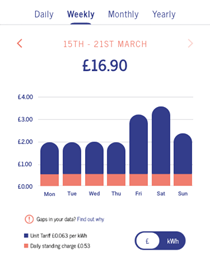
This average will give you a better idea of your daily usage. This means your energy usage may not be accurately portrayed on the days’ communication was lost but they will correctly add up to your total consumption and cost over that time. The total cost of this consumption will be deducted from your account balance in one go.
When you move into your new home, you’ll receive a welcome email with an activation link. This activation link is active for 14 days, so we recommend setting up your account as soon as you receive it. If you fail to activate your account before any opening credit runs out, your energy supply may be disconnected.
If you have any issues activating your account, please get in touch.